● BUILD v390  ·  Windows desktop suite

Your whole print shop, in one app.

Organize the art, clean it up, build the gang sheet, mock it up, bill it, and post the video — ten tabs, one workflow. Built by a working DTF garment shop that got tired of juggling apps — so we made our own.

Download free trial

// Free 30-day trial · no card · your files stay yours.

GANG SHEET · NO-SLICE NESTING
ROLL 57cm · CUT 100cmFILL 91% · 0 SLICED
REPLACES YOUR
Photoshop for cutouts Illustrator for ganging up sheets CorelDraw for nesting Online gang sheet builders Online mockup site Orders spreadsheet Video editor + uploader Client list in your head
Product tour

Every tool, step by step.

The whole suite in order — from filing a job's art to posting the finished shirt. Every screen below is the program as it ships today. Click any screen to see it full size.

01 · JOB FILES


Every design, filed by the job.

Pick the job and the client's whole folder opens — artwork, mockups, design files, gang sheets, videos. Local and Server sit side by side, and right-clicking a file gives you copy path, copy image, file info, open with, edit the design file, copy, move, rename or delete. The Copy / Move dialog names the file from the print itself — position, side and real size, like Left-bottom-6x6.2cm.png — with the height worked out from the file's own proportions.

Full breakdown →

Job Files tool with the right-click menu and the Copy / Move / Rename dialog
02 · CLIENTS

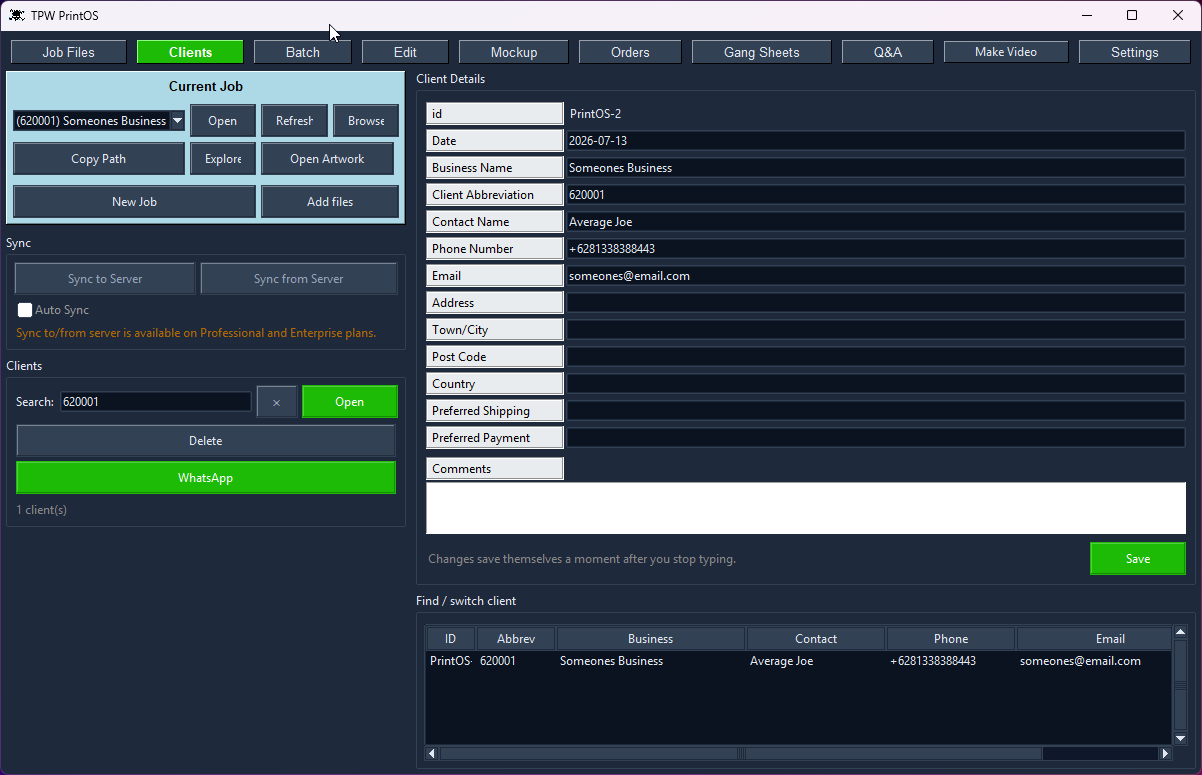
A real client book, synced.

Business name, abbreviation, contact, phone, email, address, shipping and payment preference — all searchable, with a quick-switch list underneath and WhatsApp one click away. Changes save themselves a moment after you stop typing. Auto Sync keeps everything on your own SQL server; offline, it keeps working from the local copy.

Full breakdown →

Clients tool
03 · BATCH

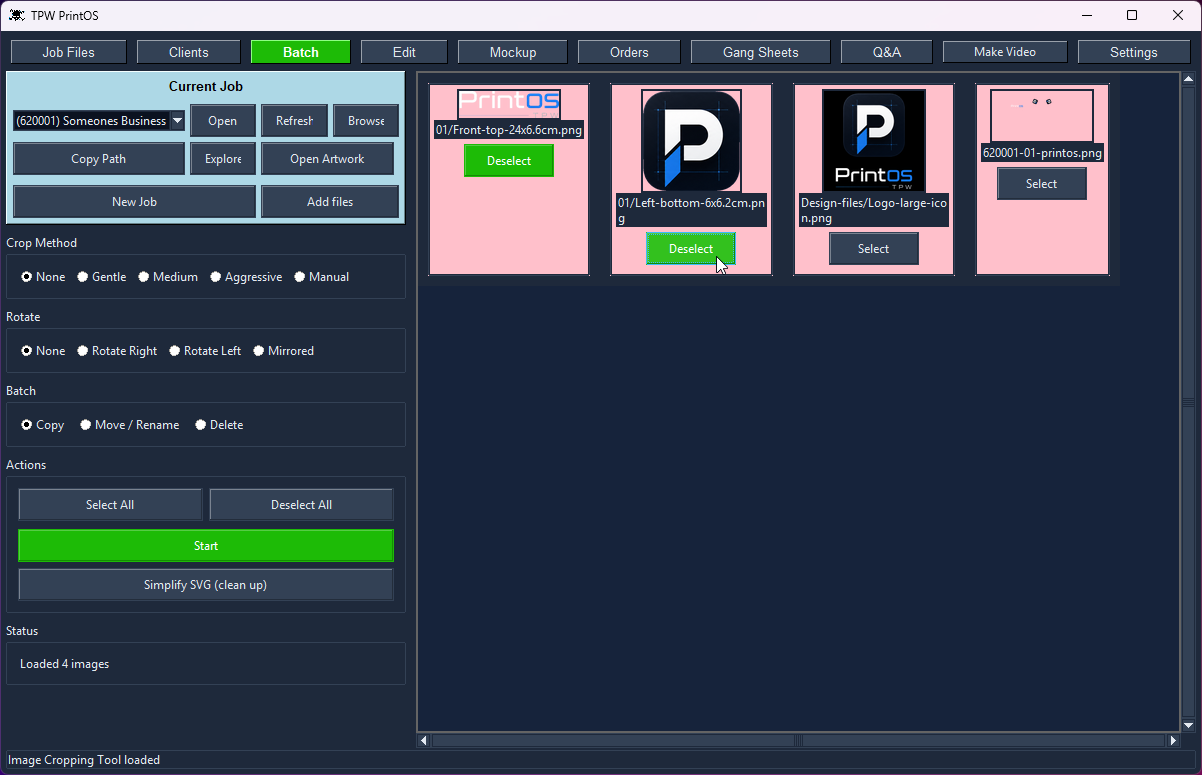
A whole folder, in one pass.

Select the files you want and act on all of them at once: crop at Gentle, Medium or Aggressive, rotate or mirror, or copy, move, rename and delete the selection. Simplify SVG cleans up vector files before they ever reach the gang sheet. Tighter files nest tighter later — less wasted film on every roll.

Full breakdown →

Batch tool
04 · EDIT


Crop, cut out and set type — one editor.

Five modes on the same image: Color Remover, Magic Wand, Crop, Rotate and Make Text. Snap a crop to the content with a tolerance for soft edges, click colours out of a background — or replace them instead of removing — grow the selection a pixel at a time, and save straight back into the job folder. No Photoshop, no round trip.

Full breakdown →

Edit tool: crop and colour remover
05 · MOCKUP

See it on the shirt before you print.


Front and back preview with each design dropped by its print position — drag to move it, pick the shirt style and fabric colour, switch the watermark on. Fill the size run from 3XS to 5XL and it totals the shirts and the price each, picks up the bill number, and adds the lot to the order. Copy to clipboard, or open a clean client preview to send.

Full breakdown →

Mockup tool and Add to order
06 · ORDERS

Orders, sizes and bills in one screen.

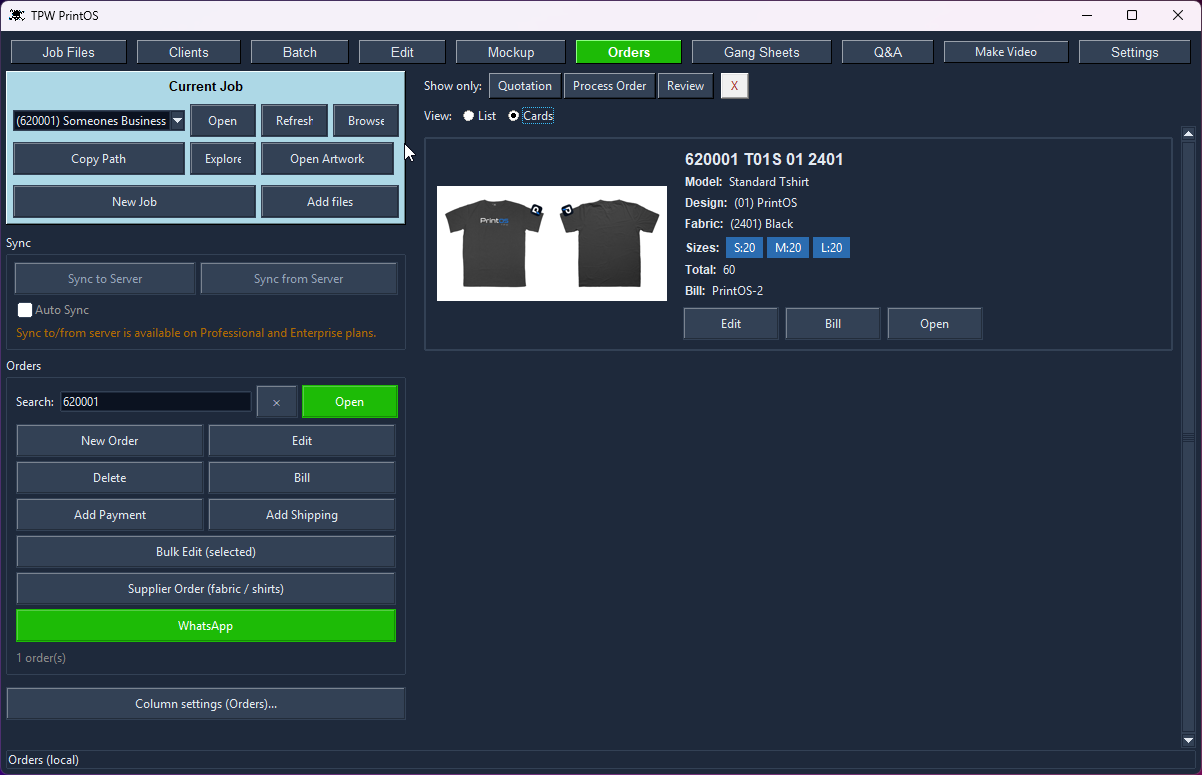
List or cards, filtered by Quotation, Process Order or Review. Every card carries the model, design, fabric colour, the size run and the bill it belongs to, with Edit, Bill and Open right there. Price from your catalogue or from production cost — cutting, sewing, rib, buttons, packing and your margin, plus the fabric for the colour you picked. Bulk-edit a selection, raise a supplier order, send it on WhatsApp.

Full breakdown →

Orders list
07 · GANG SHEETS

Load the bill. Build the sheet.


Load a bill and every design arrives with its quantities already worked out — 60 shirts, 60 of each print, no counting. Give each design up to four size options plus one read straight from its file name, set roll width and spacing, cut the run into lengths with a margin, and add registration markers, a CMYK colour bar and the client ID and date. Price per cm shows what the job costs as you go.

Full breakdown →

Gang Sheets: design selection, load bill and roll settings
08 · GANG SHEET · BOX EDITOR

Nested tight — nothing sliced.

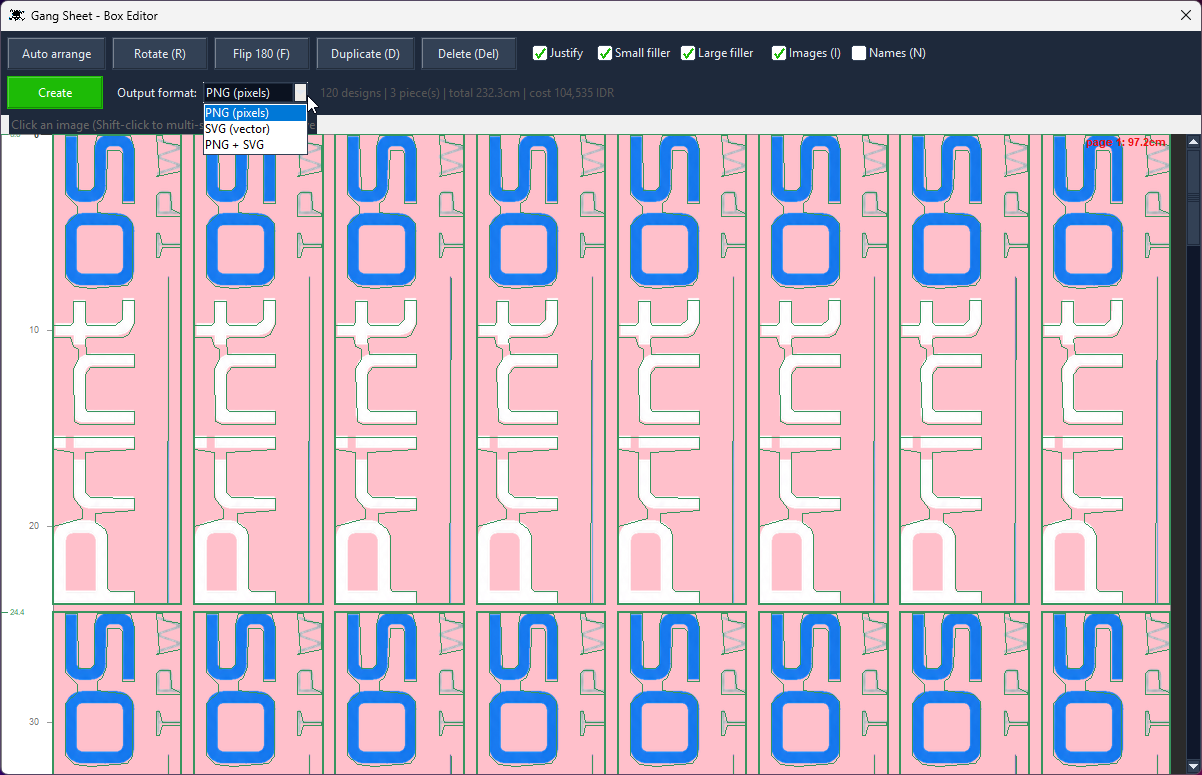
Auto-arrange packs the whole sheet, justifies each row to the edges for cutting room, and plugs the gaps with your own filler logos. Rotate, flip, duplicate, move or delete any piece by hand. Then pick your output: PNG pixels, SVG vector, or both. Here: 120 designs, 3 pieces, 232.3 cm of film, costed as you look at it — and not one design sliced.

Full breakdown →

Gang Sheet box editor with the output format menu open
09 · YOUR CATALOGUE

Your products, your fabrics, your prices.


Add your own products and size runs, your fabric suppliers and what they charge by the kilo, and your printing prices per method and quantity. Every price on an order and every kilo on a supplier order comes out of this — so PrintOS quotes your shop's numbers, in your currency, not somebody else's defaults.

Full breakdown →

Own products, fabric suppliers and printing prices
10 · MAKE VIDEO

Turn a finished job into a post.

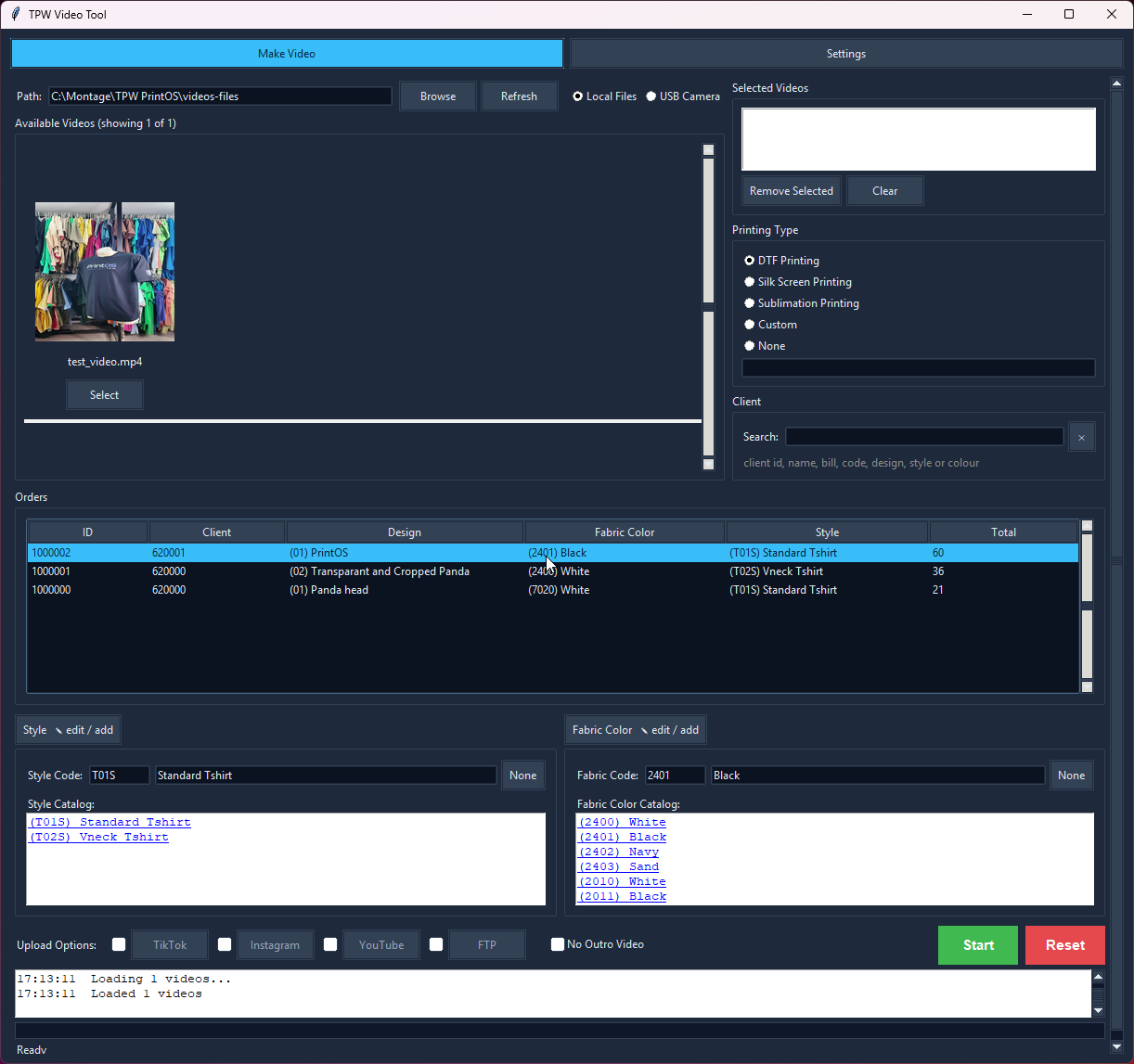
Pick your clips or pull straight from the camera, tag the printing type and client, and it loads the recent orders, shirt names and colours. Add music and an outro, then publish in one click to TikTok, Instagram, YouTube or FTP — with GPU-accelerated encoding.

Full breakdown →

Video tool
11 · SUPPLIER ORDERS

What to order, and who from.

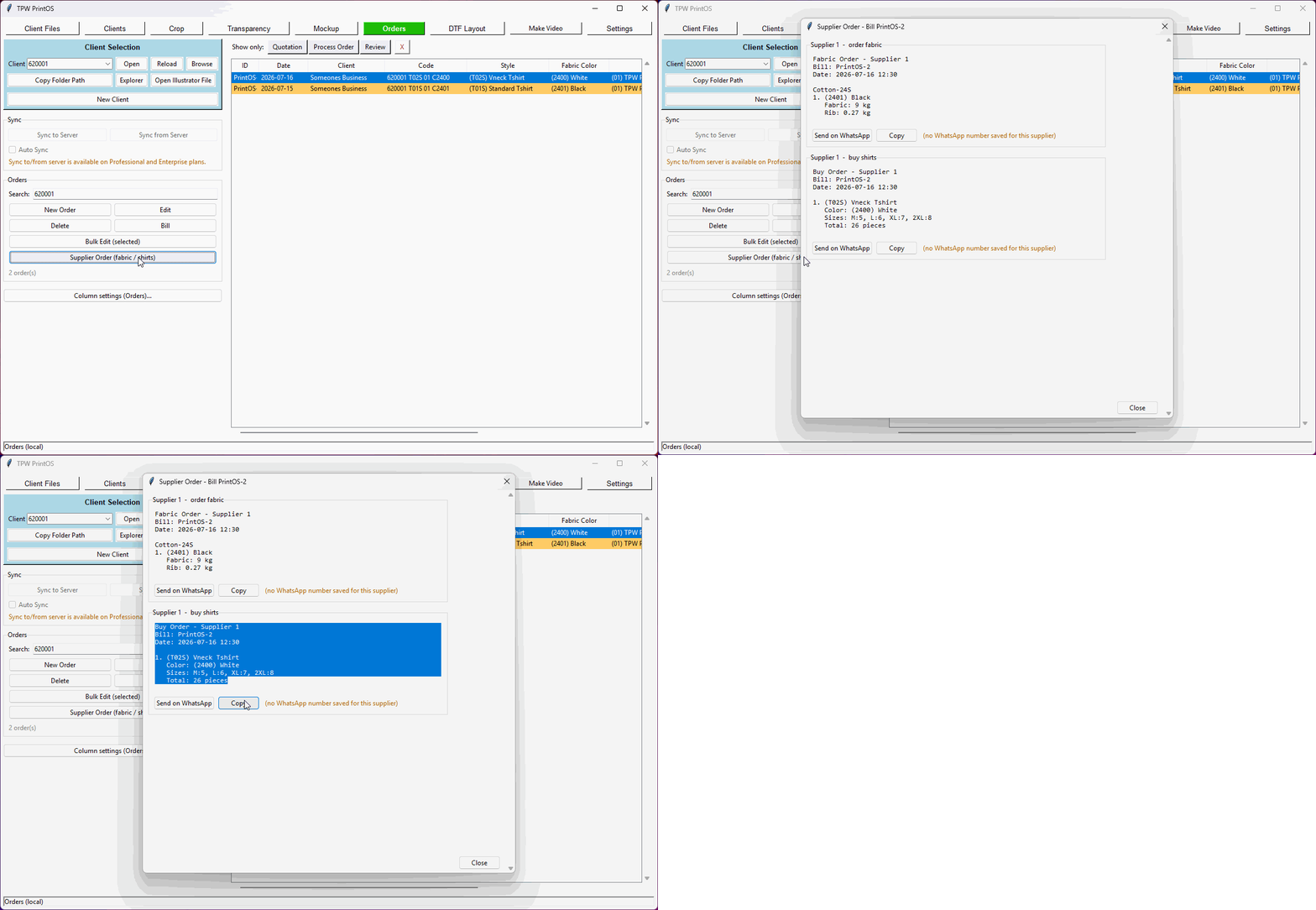
Open a bill and PrintOS works out the fabric and rib in kilos per colour, or the finished shirts and sizes for anything you buy in — grouped by supplier, ready to send on WhatsApp. It knows which supplier sells which fabric from your own data, so there's no mapping table to keep in step.

Full breakdown →

Supplier order
12 · REPORTS

The numbers your accountant asks for.

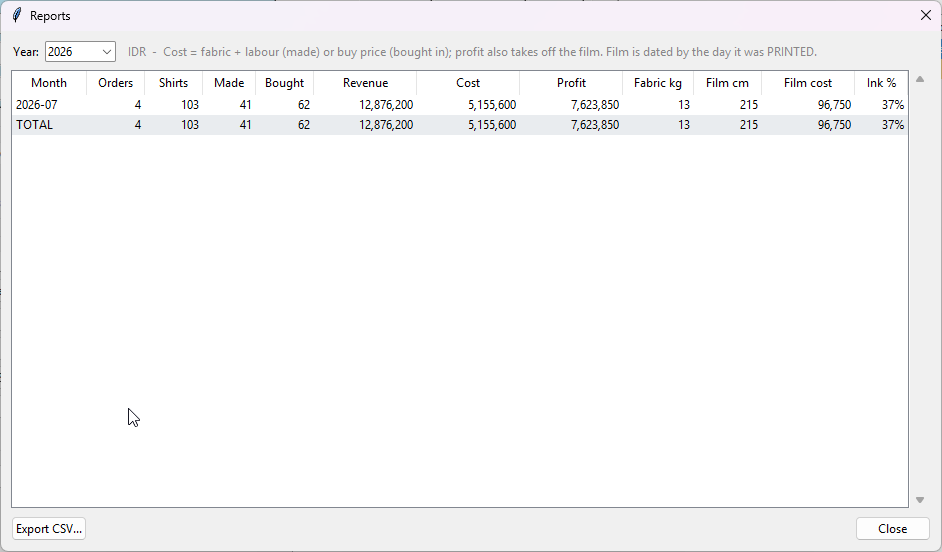
Shirts made, revenue, cost and profit month by month — split between what you made and what you bought in — with fabric kilos, DTF film used and average ink coverage. Export it to CSV. Revenue is dated by the order; film by the day it was actually printed.

Full breakdown →

Reports
Why PrintOS

Built for how a shop actually works.

Most print software is made by people who've never run a press. This is the opposite.

01

Made by a real print shop

Every feature exists because a working DTF shop needed it that week — not because it looked good on a roadmap.

Generic RIPs: built for printers in general, not you
02

Protects your prints

The gang sheet nesting engine packs tightly to save film, but never slices a design. Quality first, savings second — in that order.

Others: slice to save film, ruin the print
03

One suite, not nine tabs

Job files, batch, edit, gang sheets, mockup, orders, clients and video share one job panel and one config. Learn it once.

Others: a stack of apps that never talk
04

Yours, and global-ready

Runs on your machine, syncs to your own site, speaks your language, and prices in your currency. No cloud holding your clients hostage.

SaaS: your client list lives on their server
05

Your data, wide open

The local databases are plain SQLite — not encrypted, not locked. Read them, back them up, or build your own website or system straight on top of your own data.

Others: locked formats you can't get out of
06

Keeps working offline

Everything runs against a local database first, so a dropped connection never stops a job. Sync when you're ready, not when the software demands it.

Cloud tools: no internet, no work
07

Knows what a job cost you

Fabric, rib, labour or buy-in price, plus the DTF film off the roll — PrintOS records it as you work, so a month's real profit is a click away, not a weekend with a spreadsheet.

Others: you find out at tax time
Pricing

Try it free. Then buy it once.

Download and run the full suite free for 30 days — no card, no account. When you're ready, it's a one-time licence, never a subscription. Updates are always free.

FREE 30-DAY TRIAL

Download it and try everything.

Every tool unlocked for 30 days. Install it on your own machine and run it on your own jobs — no payment details required.

Download free trial

Local Edition

$199one-time

Perfect for small print shops and single users.

  • All design & production tools
  • Mockup Maker, Gang Sheet Builder, Video Maker
  • Background Remover, Crop Tool
  • Client Manager
  • Product & Fabric Database
  • Local SQLite database
  • Unlimited local projects
  • 1 computer
Get Local Edition
MOST POPULAR

Professional

$499one-time

For small teams sharing work across a few machines.

  • Everything in Local Edition
  • 3 computers included
  • Online sync over the internet
  • Shared clients, orders & designs
  • Shared Job Files across the team
  • Everyone stays up to date automatically
  • Extra computers: $199 each
Get Professional

Enterprise

$999one-time

For businesses running multiple stations or sites.

  • Everything in Professional
  • 5 computers included
  • Central database
  • Website integration
  • Automatic backups
  • Licence management
  • Cloud synchronization & API access
  • Multi-user — unlimited within one company / location
  • Extra computers: $199 each
Talk to us
Updates & ownership

You're buying it, not renting it.

Free updates, always

Download the latest version whenever you like. No update fees, ever — new features included.

Buy once, own it

A one-time licence, not a subscription. The software keeps working for as long as you use it.

Licensed per computer

Each licence covers its computers; add more any time at $199 each, all within your business.

Support

Help when you need it.

INCLUDED · FREE
  • Bug reports
  • Activation issues
  • Installation help
Questions

The practical stuff.

QInstalling PrintOS

There's no installer to fight with — PrintOS ships as a ZIP containing the program, its folders and some sample files.

  1. Download the ZIP from the download page.
  2. Unzip it wherever you want it to live — a folder on your C: drive, a work drive, even a USB stick.
  3. Run the program from that folder. It keeps its settings and data alongside itself.

Your 30-day trial starts the first time you run it, with every tool unlocked. To update later, just download the newer ZIP.

QDatabases and file formats

Databases

  • Local: SQLite — no setup, runs offline.
  • Online: MySQL / SQL over your own server (Professional and Enterprise).

The local databases are plain, unencrypted SQLite files sitting in your PrintOS folder. Open them with any SQLite tool, back them up by copying the file, or read them from your own code.

Files

  • Designs: PNG with transparency (recommended), JPG.
  • Layouts: exported print-ready sheets with registration marks and a CMYK colour bar.
  • Video: MP4, Instagram / TikTok formats, GPU-accelerated encoding.

QIs this a subscription?

No. PrintOS is a one-time licence. You buy it once and keep it — there's no expiry and no monthly fee.

Updates are free too: download the latest version whenever you like.

QHow many computers can I use it on?

It depends on your edition:

  • Local Edition — 1 computer.
  • Professional — 3 computers.
  • Enterprise — 5 computers.

Extra computers are US$199 each, any time. A licence covers computers within your own company or location.

QCan I try it first?

Yes — download it and run the full suite free for 30 days. Every tool is unlocked, no card and no account needed.

Read every question →

Get started

Stop juggling six apps.

Run your whole print shop from one tool — built by people who actually run one.