Colour remover and a magic wand you tune per RGB channel — click, apply, save. Ready to print with a clean transparent edge.
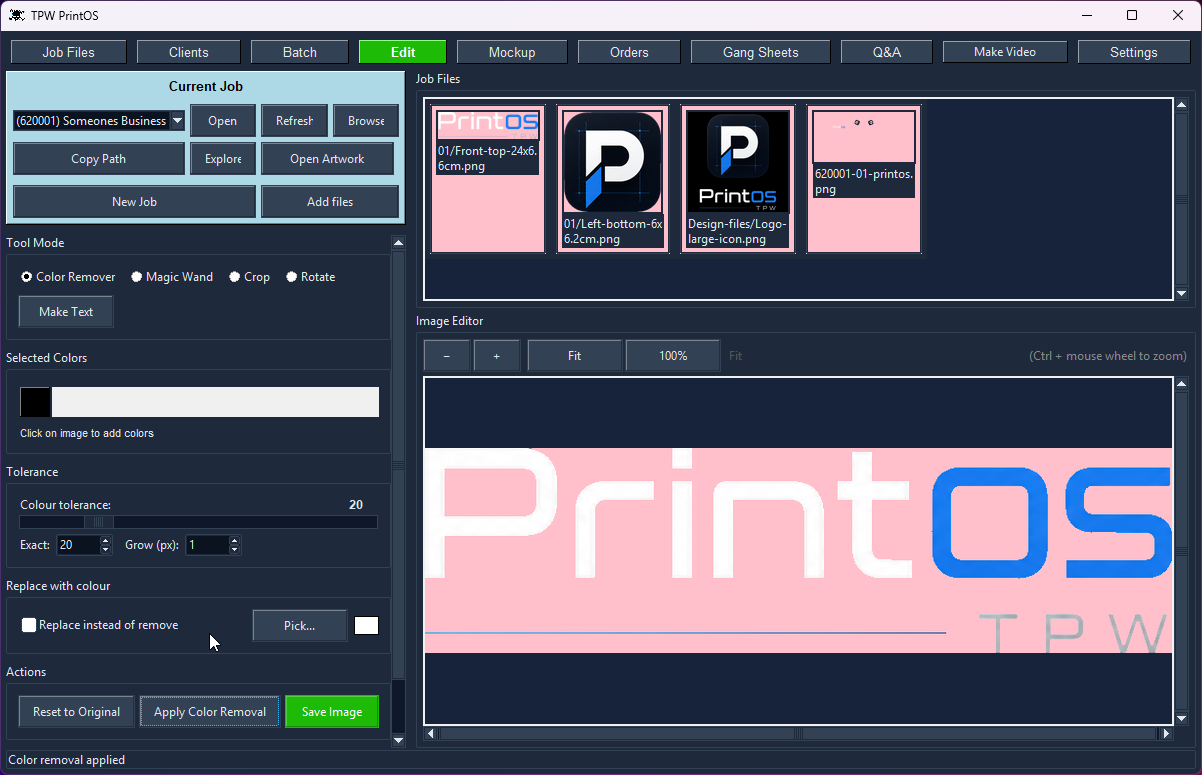
Colour remover with tolerance and grow — or replace the colour instead of removing it.
Photoshop for one job: knocking a white background off a customer's logo. That's an expensive subscription and a slow launch for a thirty-second task.
PrintOS gives you two ways to do it. The colour remover lets you click the colours you want gone — click as many as you like, the list builds up, and every shade within tolerance goes with them. The magic wand selects a region, and you tune the tolerance per red, green and blue channel separately — which is what saves you when a logo's background is nearly the same colour as the logo itself, and a single tolerance slider would eat both.
Transparency is checked against a background colour of your choosing, so a white design on white film isn't invisible while you work. Set it once in Settings and every tool uses it.
Work straight from the client's folder — the thumbnails are right there, including the ones in design subfolders. When you're done, the same copy / move / rename dialog the rest of PrintOS uses files it where it belongs, named after the print. Clean transparent edges, ready to crop and gang.
Knock out flat backgrounds in one pass.
Click as many selection points as you need, then apply.
Tune tolerance per RGB channel for edges that fight back.
Set the transparent-background colour you check against.
Go back to the original if a pass goes wrong.
The cleaned file stays in the client's folder for the next tool.

Crop, Magic Wand, Colour Remover, Rotate and Make Text on one image.
In this video, I demonstrate how TPW PrintOS can take a single logo image and prepare it for production in just a few clicks.
Starting with one logo containing both the icon and text, I:
• Split the logo into separate icon and text images.
• Use the Magic Wand tool to remove the background from the icon.
• Move the icon into the Design 01 folder and rename it to Left Arm Bottom – 6 cm.
• Use the Color Remover tool to instantly remove the black background from the text.
• Save the text as Front Top – 24 cm.
• Return to the Crop Tool and automatically crop both images using the Gentle Crop method.
• Overwrite the original files.
• Open the Mockup Tool, where both designs are automatically positioned on the t-shirt based on their saved print locations.
Everything is saved inside the client's folder, making artwork easy to organize, reuse, and prepare for production.
TPW PrintOS Features
If you're looking for software built specifically for custom apparel printing, DTF, DTG, and screen printing, TPW PrintOS is designed to streamline the entire production process.
PrintOS runs your job in one app, in the order you'd actually work:
Pick a job once and every tab follows it.
There's no installer to fight with — PrintOS ships as a ZIP containing the program, its folders and some sample files.
Your 30-day trial starts the first time you run it, with every tool unlocked. To update later, just download the newer ZIP.
Never. The nesting engine packs the sheet tightly and fills gaps with filler images, but a design is always treated as one whole piece.
If something doesn't fit cleanly it stays too big rather than getting cut — because a sliced print is scrap.
Yes — download it and run the full suite free for 30 days. Every tool is unlocked, no card and no account needed.
Yes — and a bit more than most.
PrintOS builds DTF gang sheets from your designs: set your roll width and spacing, give each design its sizes and quantities, and it nests everything tight, cuts the run into lengths, and adds registration marks, a CMYK colour bar and the client ID and date.
Two differences worth knowing:
Yes. PrintOS includes a video maker built for print shops, not a general editor.
Pull the clips straight off your camera or a folder, and because PrintOS already knows the client, it loads their recent orders, shirt names and fabric colours for you — so the details are right without looking anything up. Add your music and outro, and publish to TikTok, Instagram, YouTube or your own FTP in one click.
Encoding is GPU-accelerated, so exports don't hold up the shop.
Every tool shares one client, so the work flows from one to the next without re-typing anything.
Set your roll width, load the job, and get a print-ready gang sheet — nested tight, with e…
Drop a design onto a garment, pick the style and fabric colour, and send a clean preview —…
Batch-crop a client's entire folder at three sensitivities, or crop by hand with snap-to-c…
Log the job with style, fabric colour and design, fill the full size run, price it from yo…
A real client book with WhatsApp built in — and every design filed under the client it bel…
Pick the clips, tag the client, add music and an outro — then publish to TikTok, Instagram…
Set up the garments you actually sell once — then every mockup, order and bill uses them a…
Open a bill and PrintOS totals the fabric and rib in kilos per supplier, or the shirts and…
Shirts, revenue, cost and profit by month - with fabric kilos, DTF film used and ink cover…
Every tool unlocked, no card, no account. Then buy it once — there's no subscription.